A changed decision
Illustrative exampleWhen is the project review?
Friday.
The Tuesday note is still in the record. A later note moves the review to Friday.
MemStrata keeps your chats, documents and project history in an index on your own computer. Ask a question and see the exact passages behind the answer.
Free for 180 days after activation. Windows, Linux and Apple silicon.
Measured in the open
Author-run, development-exposed research using one automated judge model, GPT 5.5—not independent replication or a held-out customer evaluation. The source-aware headlines regrade the same answers with sources visible to the judge. Their reference-aware scores are 92.6% (463/500) on LongMemEval-S and 78.25% (1205/1540) on LoCoMo. These are not new reader runs or product guarantees. Compare the grading methods.
The research reader was Qwen 3.8 27B Q4. The built-in chat suggests that model but does not require it: you can choose a local Ollama model, a local OpenAI-compatible server, or a cloud provider you configure, and the published accuracy figures apply only to the measured Qwen configuration. Weights are not bundled. Claude Code and the VS Code extension let the AI you already use read the evidence instead.
How it works
Prepare private memory, then add chats, notes or documents.
Setup lets you choose the answer model used for Standard and Deep.
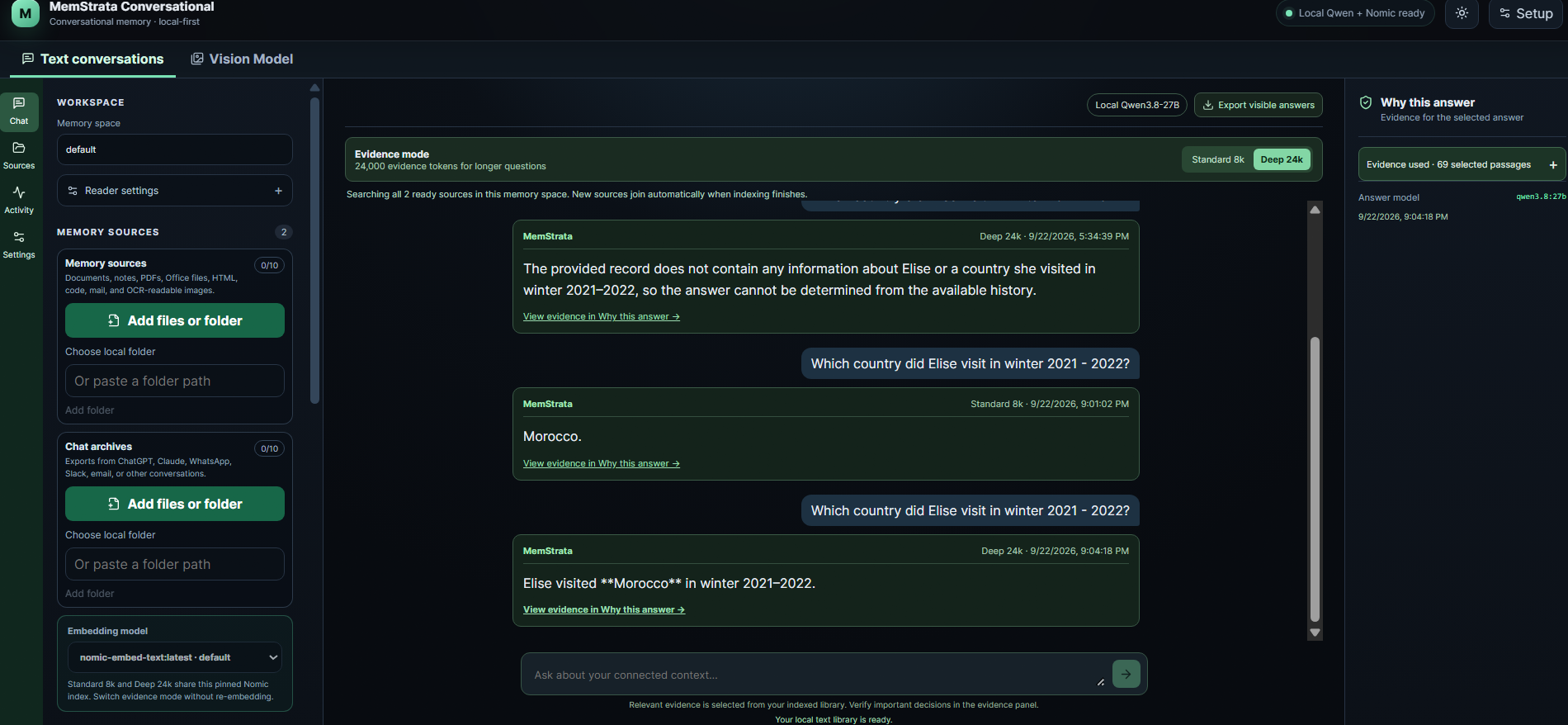
Ask in the chat. Standard and Deep use the same index. Open Why this answer and read the passages behind the answer.
Indexes and source processing run on your device. Account, licensing, and optional connectors use MemStrata or destination services. The built-in Conversational chat answers with the model you choose: with a local model the question and evidence stay on your computer, and with a cloud provider they go to that provider after you consent. If you send evidence to a cloud model or an MCP client, the question and selected passages leave the device for that provider. Credentials stay in the operating-system credential vault. Customer content is not used for training unless the customer separately opts in. Conversational 0.8.0 also makes two requests to public services whether or not you use a cloud provider. At startup and every 24 hours it downloads OpenRouter’s public model price list to estimate cloud-provider costs, and when you open the dashboard it requests the US-dollar to Canadian-dollar exchange rate from the Bank of Canada’s public data service to show subscription amounts. The requests contain no API key, question, source content or MemStrata account identifier, but they reveal your IP address to OpenRouter and the Bank of Canada. There is no setting to turn them off in 0.8.0. We plan to make both happen only when a cloud provider is configured in a later release.
See the idea
A deadline moves. A count spans many conversations. A detail was never mentioned. Step through three short examples and open the sources behind each answer.
Four products
Conversational, Coder, Structured and Governance each do one job well. Start with the one that matches your work.
Ask about imported documents and chats with inspectable evidence
Supply relevant repository context to a supported coding tool
Answer supported current, history and change questions over records
Observe connected agent actions and use supported controls
Read our published research on arXiv. Every benchmark result on this site keeps its denominator, judge and method label. Research results, measured under the stated conditions.
Indexes and source processing run on your device. Account, licensing, and optional connectors use MemStrata or destination services. The built-in Conversational chat answers with the model you choose: with a local model the question and evidence stay on your computer, and with a cloud provider they go to that provider after you consent. If you send evidence to a cloud model or an MCP client, the question and selected passages leave the device for that provider. Credentials stay in the operating-system credential vault. Customer content is not used for training unless the customer separately opts in. Conversational 0.8.0 also makes two requests to public services whether or not you use a cloud provider. At startup and every 24 hours it downloads OpenRouter’s public model price list to estimate cloud-provider costs, and when you open the dashboard it requests the US-dollar to Canadian-dollar exchange rate from the Bank of Canada’s public data service to show subscription amounts. The requests contain no API key, question, source content or MemStrata account identifier, but they reveal your IP address to OpenRouter and the Bank of Canada. There is no setting to turn them off in 0.8.0. We plan to make both happen only when a cloud provider is configured in a later release.
Read the trust pageInstall Conversational, connect a folder of notes or an exported chat, and open the evidence behind your first answer.