Conversational
Find a changed deadline across two notes, then open the source that supports the answer.
Ask about imported documents and chats with inspectable evidence. People who want to ask imported chats, notes and documents with the AI they already use, then inspect the evidence.
Technical specifications
You connect your own AI. Nomic selects text evidence. Optional ColQwen2 and ColFlor select pages. They are not the answering model. Product Standard mode uses 8,192 tokens of evidence. Deep uses 24,000. R454 research used a 7,000-token evidence budget. That is not a product mode. Research rows that name Qwen 3.8 27B Q4 are evaluation readers, not a model shipped in the product.
Full product access for 180 days after activation. No subscription during the trial.
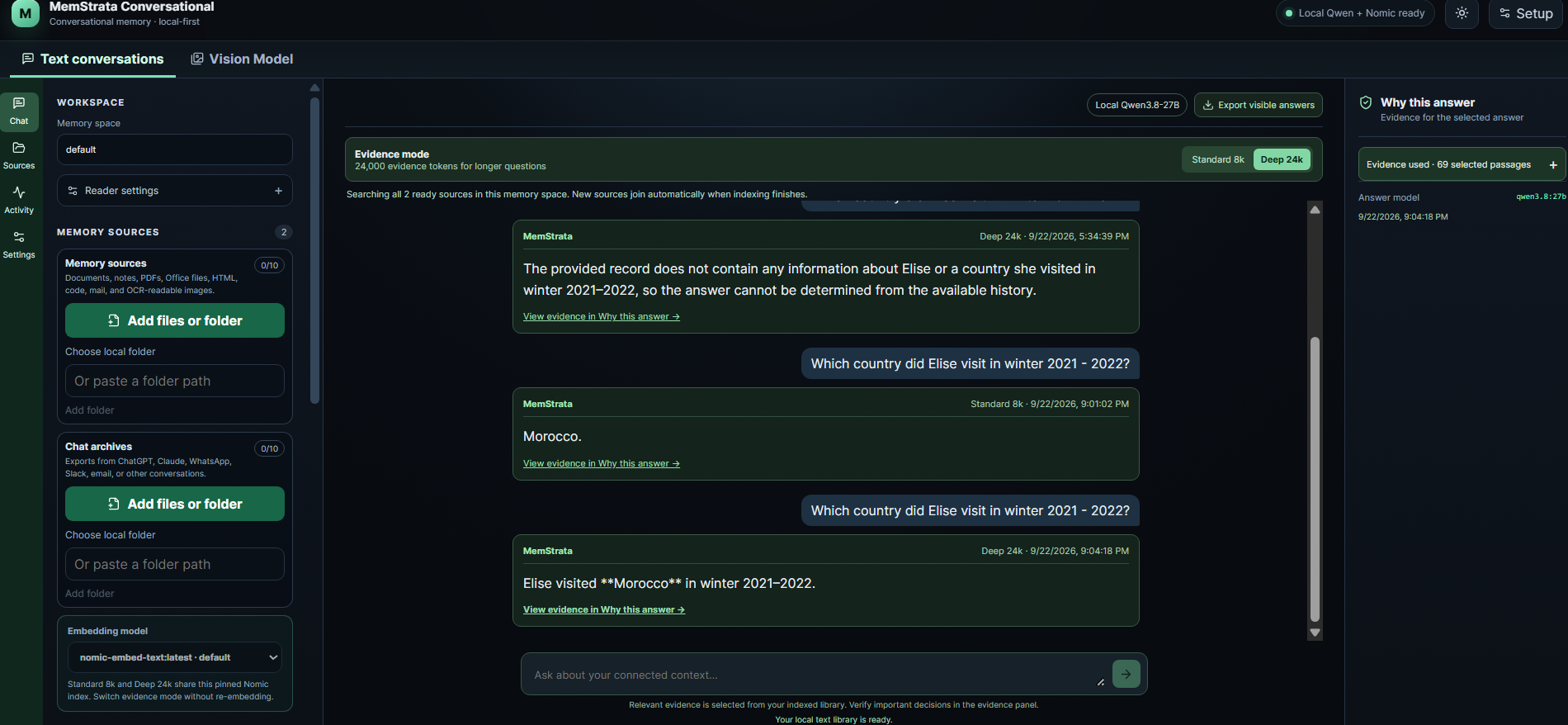
A decision changed. The record did not disappear.
IllustrativeA project review moved from Tuesday to Friday
Ask what day the review is. Open the original note dated Tuesday and the correction dated Friday. The answer should show Friday and the source that changed it.
- 01
Install
Create a dedicated environment, install the pinned Conversational package, then run init.
- 02
Add a source
Start with one chat export, note or PDF you can inspect.
- 03
Ask and open the source
Read the answer, then open the selected evidence and the later correction if one exists.
A source you can inspect
Open the original material and see what supports the result. A cited source makes the answer easier to check. It is not a guarantee that every answer is correct.
Will it run on my computer?
This check uses the published install platforms. It does not detect graphics memory.
What it does
- Bring chats, notes and documents into a local index
- Nomic finds relevant text. Tesseract reads scans. The AI you connect writes the answer from the evidence MemStrata selects.
- Optional ColQwen2 and ColFlor select original pages. They are not the final answer.
- EVIE and ColPali are coming soon and are not listed as supported downloads.
- Detecting a GPU is separate from installing a compatible runtime. Visual retrieval and the model you connect use separate settings.
Requirements
The hardware guide lists install platforms and evidence limits. It does not size the AI you connect. See the hardware guide.
- Python 3.10 or newer
- Windows x64, Linux x86_64 with glibc 2.28 or newer, or macOS 15 on Apple silicon
- An AI you already use. Conversational does not ship a built-in answering model
Supported connections
- The AI you connect: writes the answer from selected evidence
- Tesseract OCR: scanned documents
- Nomic text retrieval: text evidence
Data handling
Indexes and source processing run on your device. Account, licensing, and optional connectors use MemStrata or destination services. If you choose a cloud answering model, the question and selected passages leave the device for that provider. Credentials stay in the operating-system credential vault. Customer content is not used for training unless the customer separately opts in.
| Feature | Local material | Possible outbound | Trigger | Credential location |
|---|---|---|---|---|
| OAuth, signed entitlements, and device registration | Device and entitlement cache | Identity and device-bound entitlement fields | Sign-in or refresh | Operating-system credential vault |
| User-selected cloud model or connector | Local evidence selection and indexes | Only the data required for that explicit operation | User configures and sends the request | Operating-system credential vault |
| MemStrata-managed email | Local alert or report draft | Minimized message and recipient | User-configured delivery; one message per signed-in user per UTC day during trial | Server secret plus entitlement |
| Memory, OCR, and optional visual retrieval | Conversation archives, notes, documents, and selected evidence pages | Selected evidence and question to a local or BYOK reader | Explicit question or configured reader call | Operating-system credential vault |
Install
Install this product
Full product access for 180 days after activation. No subscription during the trial.
Detected: choose your system. Change the operating system if this is wrong.
MemStrata Conversational 0.7.19 · Windows x64 · Python >=3.10
Windows 10 or newer, x64.
This block installs the app, checks its version, then starts onboarding with
memstrata-conversational.cmd init
The Store listing is separate from this wheel command. The version the Store delivers can differ from a newer submission still in certification.
Install with Command Prompt
Use this after activating a Python 3.10+ environment in Command Prompt. It installs the pinned version and starts setup only if installation succeeds.
Command Prompt
python -m pip install --upgrade --only-binary=:all: "memstrata-conversational==0.7.19" && python -m memstrata_conversational_launcher initInstall with PowerShell (for developers)
PowerShell
& {
  $ErrorActionPreference = 'Stop'
  $v = "$env:USERPROFILE\MemStrata\venvs\conversational"
  py -3 -m venv "$v"
  if ($LASTEXITCODE -ne 0) { throw 'Environment creation failed.' }

  $p = (py -3 -c "import os,sys; print(os.path.realpath(sys.argv[1]))" "$v\Scripts\python.exe").Trim()
  if ($LASTEXITCODE -ne 0 -or -not (Test-Path -LiteralPath $p)) { throw 'Environment Python was not found.' }
  & $p -m pip install --upgrade --only-binary=:all: "memstrata-conversational==0.7.19"
  if ($LASTEXITCODE -ne 0) { throw 'Installation failed.' }

  $launcher = Join-Path (Split-Path -Parent $p) 'memstrata-conversational.cmd'
  if (-not (Test-Path -LiteralPath $launcher)) { throw 'Launcher was not installed.' }
  $actual = (& $launcher --pypi-package-version | Out-String).Trim()
  if ($LASTEXITCODE -ne 0 -or $actual -ne '0.7.19') { throw 'Installed version does not match 0.7.19.' }
  & $launcher init
}
memstrata_conversational-0.7.19-py3-none-win_amd64.whl · sha256 b29a9b63f721e3928bfe43fbf55824ab843448bc528f51ca94ab55009ec2a018
Python and platform requirements
A browser cannot reliably know your OS version or whether Python is installed.
Python 3.10 or newer is required.
If Python is missing, install it from python.org/downloads/windows and open a new terminal.
The environment uses %USERPROFILE%\MemStrata\venvs to avoid Microsoft Store Python's LocalAppData redirection and resulting long package-cache paths. Interpreter realpath resolution is retained.
Troubleshooting
If setup stops, open the troubleshooting guide. Paste the PowerShell block into PowerShell or the separate Command Prompt block into Command Prompt.
MemStrata Conversational 0.7.19 · Linux x86_64 (glibc 2.28 or newer) · Python >=3.10
Linux x86_64 with glibc 2.28 or newer.
This block installs the app, checks its version, then starts onboarding with
memstrata-conversational init
Already in a Python 3.10+ environment:
python -m pip install --upgrade --only-binary=:all: memstrata-conversational==0.7.19
Install with Terminal (bash/zsh)
Terminal (bash/zsh)
venv="$HOME/.local/share/memstrata/venvs/conversational"
python3 -m venv "$venv" || exit 1
"$venv/bin/python" -m pip install --upgrade pip || exit 1
wheel='https://files.pythonhosted.org/packages/43/85/4f9023d9068b30b1b41bdd84dbff423a34d1b5131130356253f89a081f1d/memstrata_conversational-0.7.19-py3-none-manylinux_2_28_x86_64.whl'
"$venv/bin/python" -m pip install --only-binary=:all: "$wheel" || exit 1
actual_version=$("$venv/bin/memstrata-conversational" --pypi-package-version) || exit 1
[ "$actual_version" = "0.7.19" ] || { echo "Installed version does not match the advertised release."; exit 1; }
echo "Installed version: $actual_version"
"$venv/bin/memstrata-conversational" init
memstrata_conversational-0.7.19-py3-none-manylinux_2_28_x86_64.whl · sha256 57516cd5fa81a99f73fcf852db95f66f9d6aceb276008acc6b2360d17938c592
Python and platform requirements
A browser cannot reliably know your OS version or whether Python is installed.
Python 3.10 or newer is required.
Use bash or zsh on Linux x86_64 with glibc 2.28 or newer.
Your Python installation must include venv and ensurepip. If environment creation reports missing ensurepip,
install your distribution’s Python venv package (usually python3-venv on Debian/Ubuntu) and try again.
Troubleshooting
If setup stops, open the troubleshooting guide.
MemStrata Conversational 0.7.19 · macOS 15 or newer on Apple silicon · Python >=3.10
macOS 15 or newer on Apple silicon.
This block installs the app, checks its version, then starts onboarding with
memstrata-conversational init
Already in a Python 3.10+ environment:
python -m pip install --upgrade --only-binary=:all: memstrata-conversational==0.7.19
Install with Terminal (bash/zsh)
Terminal (bash/zsh)
venv="$HOME/.local/share/memstrata/venvs/conversational"
python3 -m venv "$venv" || exit 1
"$venv/bin/python" -m pip install --upgrade pip || exit 1
wheel='https://files.pythonhosted.org/packages/c6/b3/64ea1824629a096504dabc1ade5bc02ee353293f28d2d555d9bcec0a7e8c/memstrata_conversational-0.7.19-py3-none-macosx_15_0_arm64.whl'
"$venv/bin/python" -m pip install --only-binary=:all: "$wheel" || exit 1
actual_version=$("$venv/bin/memstrata-conversational" --pypi-package-version) || exit 1
[ "$actual_version" = "0.7.19" ] || { echo "Installed version does not match the advertised release."; exit 1; }
echo "Installed version: $actual_version"
"$venv/bin/memstrata-conversational" init
memstrata_conversational-0.7.19-py3-none-macosx_15_0_arm64.whl · sha256 70da3d2e79dd4a33a201bbf10b6c59856866cc33342e700e94fbcf8a0fe775e5
Python and platform requirements
A browser cannot reliably know your OS version or whether Python is installed. Python 3.10 or newer is required. Use Terminal on an Apple silicon Mac running macOS 15 or newer, with native arm64 Python. Intel Macs and an x86_64 Python running under Rosetta are not supported by this arm64 wheel.
Troubleshooting
If setup stops, open the troubleshooting guide.
MemStrata Coder 0.6.32 · Windows x64 · Python >=3.10
Windows 10 or newer, x64.
This block installs the app, checks its version, then starts onboarding with
memstrata-coder.cmd init
The Store listing is separate from this wheel command. The version the Store delivers can differ from a newer submission still in certification.
Install with PowerShell (for developers)
PowerShell
$venv = "$env:USERPROFILE\MemStrata\venvs\coder"
py -3 -m venv "$venv"
if ($LASTEXITCODE -ne 0) { throw 'Could not create the environment.' }
$python = "$venv\Scripts\python.exe"
if (-not (Test-Path -LiteralPath $python)) {
  $python = (py -3 -c "import os, sys; print(os.path.realpath(sys.argv[1]))" $python).Trim()
}
if (-not (Test-Path -LiteralPath $python)) { throw 'Could not create the environment.' }
$scripts = Split-Path -Parent $python
& $python -m pip install --upgrade pip
if ($LASTEXITCODE -ne 0) { throw 'Could not update pip.' }
$wheel = 'https://files.pythonhosted.org/packages/d4/85/63fa52b44263148a68f5780dae7e18767a078c69261b5367fce08d79818e/memstrata_coder-0.6.32-py3-none-win_amd64.whl'
& $python -m pip install --only-binary=:all: "$wheel"
if ($LASTEXITCODE -ne 0) { throw 'Installation did not finish.' }
$actualVersion = (& "$scripts\memstrata-coder.cmd" --pypi-package-version | Out-String).Trim()
if ($LASTEXITCODE -ne 0 -or $actualVersion -ne '0.6.32') { throw 'The installed version does not match the advertised release.' }
Write-Output "Installed version: $actualVersion"
& "$scripts\memstrata-coder.cmd" init
memstrata_coder-0.6.32-py3-none-win_amd64.whl · sha256 ef1bd4506921e848f8e7a73a25b3a384a8013456cbddb652e3048b8fec062b26
Python and platform requirements
A browser cannot reliably know your OS version or whether Python is installed.
Python 3.10 or newer is required.
If Python is missing, install it from python.org/downloads/windows and open a new terminal.
The environment uses %USERPROFILE%\MemStrata\venvs to avoid Microsoft Store Python's LocalAppData redirection and resulting long package-cache paths. Interpreter realpath resolution is retained.
Troubleshooting
If setup stops, open the troubleshooting guide. Windows commands are PowerShell. Do not paste them into Command Prompt.
MemStrata Coder 0.6.32 · Linux x86_64 (glibc 2.28 or newer) · Python >=3.10
Linux x86_64 with glibc 2.28 or newer.
This block installs the app, checks its version, then starts onboarding with
memstrata-coder init
Install with Terminal (bash/zsh)
Terminal (bash/zsh)
venv="$HOME/.local/share/memstrata/venvs/coder"
python3 -m venv "$venv" || exit 1
"$venv/bin/python" -m pip install --upgrade pip || exit 1
wheel='https://files.pythonhosted.org/packages/7c/ea/4e56e6f26074f9ee6e8d785b927571a425458b603f25cc9d8d6b425e947a/memstrata_coder-0.6.32-py3-none-manylinux_2_28_x86_64.whl'
"$venv/bin/python" -m pip install --only-binary=:all: "$wheel" || exit 1
actual_version=$("$venv/bin/memstrata-coder" --pypi-package-version) || exit 1
[ "$actual_version" = "0.6.32" ] || { echo "Installed version does not match the advertised release."; exit 1; }
echo "Installed version: $actual_version"
"$venv/bin/memstrata-coder" init
memstrata_coder-0.6.32-py3-none-manylinux_2_28_x86_64.whl · sha256 e3c3a5c39a576963f76a000bdcf455452af051f0371c4b76645a43e1166479a5
Python and platform requirements
A browser cannot reliably know your OS version or whether Python is installed.
Python 3.10 or newer is required.
Use bash or zsh on Linux x86_64 with glibc 2.28 or newer.
Your Python installation must include venv and ensurepip. If environment creation reports missing ensurepip,
install your distribution’s Python venv package (usually python3-venv on Debian/Ubuntu) and try again.
Troubleshooting
If setup stops, open the troubleshooting guide.
MemStrata Coder 0.6.32 · macOS 15 or newer on Apple silicon · Python >=3.10
macOS 15 or newer on Apple silicon.
This block installs the app, checks its version, then starts onboarding with
memstrata-coder init
Install with Terminal (bash/zsh)
Terminal (bash/zsh)
venv="$HOME/.local/share/memstrata/venvs/coder"
python3 -m venv "$venv" || exit 1
"$venv/bin/python" -m pip install --upgrade pip || exit 1
wheel='https://files.pythonhosted.org/packages/d4/0e/1178d2b6dd5cdcfccbcb292b39b6a47ce56d7f225f3fcc3059d713d6d83b/memstrata_coder-0.6.32-py3-none-macosx_15_0_arm64.whl'
"$venv/bin/python" -m pip install --only-binary=:all: "$wheel" || exit 1
actual_version=$("$venv/bin/memstrata-coder" --pypi-package-version) || exit 1
[ "$actual_version" = "0.6.32" ] || { echo "Installed version does not match the advertised release."; exit 1; }
echo "Installed version: $actual_version"
"$venv/bin/memstrata-coder" init
memstrata_coder-0.6.32-py3-none-macosx_15_0_arm64.whl · sha256 85d3b467d1a2694ddeca1b3a392092c59a5cf517dfa6aec129c9f9b9a17999a2
Python and platform requirements
A browser cannot reliably know your OS version or whether Python is installed. Python 3.10 or newer is required. Use Terminal on an Apple silicon Mac running macOS 15 or newer, with native arm64 Python. Intel Macs and an x86_64 Python running under Rosetta are not supported by this arm64 wheel.
Troubleshooting
If setup stops, open the troubleshooting guide.
MemStrata Structured 0.7.3 · Windows x64 · Python >=3.10
Windows 10 or newer, x64.
This block installs the app, checks its version, then starts onboarding with
memstrata-structured.cmd init
The Store listing is separate from this wheel command. The version the Store delivers can differ from a newer submission still in certification.
Install with PowerShell (for developers)
PowerShell
$venv = "$env:USERPROFILE\MemStrata\venvs\structured"
py -3 -m venv "$venv"
if ($LASTEXITCODE -ne 0) { throw 'Could not create the environment.' }
$python = "$venv\Scripts\python.exe"
if (-not (Test-Path -LiteralPath $python)) {
  $python = (py -3 -c "import os, sys; print(os.path.realpath(sys.argv[1]))" $python).Trim()
}
if (-not (Test-Path -LiteralPath $python)) { throw 'Could not create the environment.' }
$scripts = Split-Path -Parent $python
& $python -m pip install --upgrade pip
if ($LASTEXITCODE -ne 0) { throw 'Could not update pip.' }
$base = 'https://github.com/yadu9989/memstrata-binaries'
$release = "$base/releases/download/structured-0.7.3"
$wheel = "$release/memstrata_structured-0.7.3-py3-none-win_amd64.whl"
& $python -m pip install --only-binary=:all: "$wheel"
if ($LASTEXITCODE -ne 0) { throw 'Installation did not finish.' }
$actualVersion = (& "$scripts\memstrata-structured.cmd" --pypi-package-version | Out-String).Trim()
if ($LASTEXITCODE -ne 0 -or $actualVersion -ne '0.7.3') { throw 'The installed version does not match the advertised release.' }
Write-Output "Installed version: $actualVersion"
& "$scripts\memstrata-structured.cmd" init
memstrata_structured-0.7.3-py3-none-win_amd64.whl · sha256 63133a1dae1834a39f02f6eb574e1b9d2a834f784aff98d36f3f86f6392e61e0
Python and platform requirements
A browser cannot reliably know your OS version or whether Python is installed.
Python 3.10 or newer is required.
If Python is missing, install it from python.org/downloads/windows and open a new terminal.
The environment uses %USERPROFILE%\MemStrata\venvs to avoid Microsoft Store Python's LocalAppData redirection and resulting long package-cache paths. Interpreter realpath resolution is retained.
Troubleshooting
If setup stops, open the troubleshooting guide. Windows commands are PowerShell. Do not paste them into Command Prompt.
Structured Windows uses the repaired 0.7.3 GitHub wheel. It does not fall back to PyPI 0.7.0.
MemStrata Structured 0.7.2 · Linux x86_64 (glibc 2.28 or newer) · Python >=3.10
Linux x86_64 with glibc 2.28 or newer.
This block installs the app, checks its version, then starts onboarding with
memstrata-structured init
Install with Terminal (bash/zsh)
Terminal (bash/zsh)
venv="$HOME/.local/share/memstrata/venvs/structured"
python3 -m venv "$venv" || exit 1
"$venv/bin/python" -m pip install --upgrade pip || exit 1
wheel='https://files.pythonhosted.org/packages/2b/78/ac0ba62d5433aa6c7603eb48d08b16f124d0c75c324deb402d1450d80eaa/memstrata_structured-0.7.2-py3-none-manylinux_2_28_x86_64.whl'
"$venv/bin/python" -m pip install --only-binary=:all: "$wheel" || exit 1
actual_version=$("$venv/bin/memstrata-structured" --pypi-package-version) || exit 1
[ "$actual_version" = "0.7.2" ] || { echo "Installed version does not match the advertised release."; exit 1; }
echo "Installed version: $actual_version"
"$venv/bin/memstrata-structured" init
memstrata_structured-0.7.2-py3-none-manylinux_2_28_x86_64.whl · sha256 432f1c83702070a2b5d7819eb00f49e6448a9ae86a664b20f9709264526b5f5b
Python and platform requirements
A browser cannot reliably know your OS version or whether Python is installed.
Python 3.10 or newer is required.
Use bash or zsh on Linux x86_64 with glibc 2.28 or newer.
Your Python installation must include venv and ensurepip. If environment creation reports missing ensurepip,
install your distribution’s Python venv package (usually python3-venv on Debian/Ubuntu) and try again.
Troubleshooting
If setup stops, open the troubleshooting guide.
MemStrata Structured 0.7.2 · macOS 15 or newer on Apple silicon · Python >=3.10
macOS 15 or newer on Apple silicon.
This block installs the app, checks its version, then starts onboarding with
memstrata-structured init
Install with Terminal (bash/zsh)
Terminal (bash/zsh)
venv="$HOME/.local/share/memstrata/venvs/structured"
python3 -m venv "$venv" || exit 1
"$venv/bin/python" -m pip install --upgrade pip || exit 1
base='https://github.com/yadu9989/memstrata-binaries'
release="$base/releases/download/structured-0.7.2"
wheel="$release/memstrata_structured-0.7.2-py3-none-macosx_15_0_arm64.whl"
"$venv/bin/python" -m pip install --only-binary=:all: "$wheel" || exit 1
actual_version=$("$venv/bin/memstrata-structured" --pypi-package-version) || exit 1
[ "$actual_version" = "0.7.2" ] || { echo "Installed version does not match the advertised release."; exit 1; }
echo "Installed version: $actual_version"
"$venv/bin/memstrata-structured" init
memstrata_structured-0.7.2-py3-none-macosx_15_0_arm64.whl · sha256 46d5f8f533baa5d18e3510addff81c4cab9e1e61a975c567db1fabb8f99ffee6
Python and platform requirements
A browser cannot reliably know your OS version or whether Python is installed. Python 3.10 or newer is required. Use Terminal on an Apple silicon Mac running macOS 15 or newer, with native arm64 Python. Intel Macs and an x86_64 Python running under Rosetta are not supported by this arm64 wheel.
Troubleshooting
If setup stops, open the troubleshooting guide.
MemStrata Governance 0.7.2 · Windows x64 · Python >=3.10
Windows 10 or newer, x64.
This block installs the app, checks its version, then starts onboarding with
memstrata-governance.cmd init
The Store listing is separate from this wheel command. The version the Store delivers can differ from a newer submission still in certification.
Install with PowerShell (for developers)
PowerShell
$venv = "$env:USERPROFILE\MemStrata\venvs\governance"
py -3 -m venv "$venv"
if ($LASTEXITCODE -ne 0) { throw 'Could not create the environment.' }
$python = "$venv\Scripts\python.exe"
if (-not (Test-Path -LiteralPath $python)) {
  $python = (py -3 -c "import os, sys; print(os.path.realpath(sys.argv[1]))" $python).Trim()
}
if (-not (Test-Path -LiteralPath $python)) { throw 'Could not create the environment.' }
$scripts = Split-Path -Parent $python
& $python -m pip install --upgrade pip
if ($LASTEXITCODE -ne 0) { throw 'Could not update pip.' }
$wheel = 'https://files.pythonhosted.org/packages/5f/fa/121c7399f4ec5c4d132fbb3b81f213ed3428860d78b10d261086f557dc7e/memstrata_governance-0.7.2-py3-none-win_amd64.whl'
& $python -m pip install --only-binary=:all: "$wheel"
if ($LASTEXITCODE -ne 0) { throw 'Installation did not finish.' }
$actualVersion = (& "$scripts\memstrata-governance.cmd" --pypi-package-version | Out-String).Trim()
if ($LASTEXITCODE -ne 0 -or $actualVersion -ne '0.7.2') { throw 'The installed version does not match the advertised release.' }
Write-Output "Installed version: $actualVersion"
& "$scripts\memstrata-governance.cmd" init
memstrata_governance-0.7.2-py3-none-win_amd64.whl · sha256 39e716f1b57cbd4c7551dcc59469407f7917a0f19f124d8c678b450555e4a407
Python and platform requirements
A browser cannot reliably know your OS version or whether Python is installed.
Python 3.10 or newer is required.
If Python is missing, install it from python.org/downloads/windows and open a new terminal.
The environment uses %USERPROFILE%\MemStrata\venvs to avoid Microsoft Store Python's LocalAppData redirection and resulting long package-cache paths. Interpreter realpath resolution is retained.
Troubleshooting
If setup stops, open the troubleshooting guide. Windows commands are PowerShell. Do not paste them into Command Prompt.
MemStrata Governance 0.7.2 · Linux x86_64 (glibc 2.28 or newer) · Python >=3.10
Linux x86_64 with glibc 2.28 or newer.
This block installs the app, checks its version, then starts onboarding with
memstrata-governance init
Install with Terminal (bash/zsh)
Terminal (bash/zsh)
venv="$HOME/.local/share/memstrata/venvs/governance"
python3 -m venv "$venv" || exit 1
"$venv/bin/python" -m pip install --upgrade pip || exit 1
wheel='https://files.pythonhosted.org/packages/79/4e/906aa2ddf6506cbabc30cdf918856f0d4cef2c0319e37572a0388beb0763/memstrata_governance-0.7.2-py3-none-manylinux_2_28_x86_64.whl'
"$venv/bin/python" -m pip install --only-binary=:all: "$wheel" || exit 1
actual_version=$("$venv/bin/memstrata-governance" --pypi-package-version) || exit 1
[ "$actual_version" = "0.7.2" ] || { echo "Installed version does not match the advertised release."; exit 1; }
echo "Installed version: $actual_version"
"$venv/bin/memstrata-governance" init
memstrata_governance-0.7.2-py3-none-manylinux_2_28_x86_64.whl · sha256 08a46ee0a6d627e6114ce330791ee77f9a9e707b37a585d794784f94e05375fa
Python and platform requirements
A browser cannot reliably know your OS version or whether Python is installed.
Python 3.10 or newer is required.
Use bash or zsh on Linux x86_64 with glibc 2.28 or newer.
Your Python installation must include venv and ensurepip. If environment creation reports missing ensurepip,
install your distribution’s Python venv package (usually python3-venv on Debian/Ubuntu) and try again.
Troubleshooting
If setup stops, open the troubleshooting guide.
MemStrata Governance 0.7.2 · macOS 15 or newer on Apple silicon · Python >=3.10
macOS 15 or newer on Apple silicon.
This block installs the app, checks its version, then starts onboarding with
memstrata-governance init
Install with Terminal (bash/zsh)
Terminal (bash/zsh)
venv="$HOME/.local/share/memstrata/venvs/governance"
python3 -m venv "$venv" || exit 1
"$venv/bin/python" -m pip install --upgrade pip || exit 1
wheel='https://files.pythonhosted.org/packages/db/9a/5f02c7da3ea9bf04f6c229c5d87bead3f062422e08e41ce4ef38a2899d47/memstrata_governance-0.7.2-py3-none-macosx_15_0_arm64.whl'
"$venv/bin/python" -m pip install --only-binary=:all: "$wheel" || exit 1
actual_version=$("$venv/bin/memstrata-governance" --pypi-package-version) || exit 1
[ "$actual_version" = "0.7.2" ] || { echo "Installed version does not match the advertised release."; exit 1; }
echo "Installed version: $actual_version"
"$venv/bin/memstrata-governance" init
memstrata_governance-0.7.2-py3-none-macosx_15_0_arm64.whl · sha256 19411dacfbc5b1bb62f1d3e197a740b38916f33cd998f1bfb9179e69d9472ada
Python and platform requirements
A browser cannot reliably know your OS version or whether Python is installed. Python 3.10 or newer is required. Use Terminal on an Apple silicon Mac running macOS 15 or newer, with native arm64 Python. Intel Macs and an x86_64 Python running under Rosetta are not supported by this arm64 wheel.
Troubleshooting
If setup stops, open the troubleshooting guide.
180 days of full product access after activation. No subscription during the trial. Reinstalling does not restart it. Model-provider charges, if any, are separate. MemStrata-managed email is limited to one message per signed-in user per UTC day. For access after the trial, contact us about paid access. Trial terms
FAQ
Does Conversational include an answering model?
No. You use your own AI. MemStrata keeps the index on your computer and shows the passages behind the answer.
What reaches a cloud provider?
Only the content needed for the connection you choose. Local indexes stay on your device. Account services and selected remote policy checks use MemStrata services.
Who answers a PDF question?
Nomic or a visual retriever selects evidence. Tesseract reads scans. The AI you connect writes the answer. Visual retrievers are not the final answer.
Where are model weights stored?
Weights for a local answering model stay where that model stores them, typically on the same machine. MemStrata does not upload model weights as part of ordinary use.
Which model writes the answer?
The one you connect. MemStrata does not ship a built-in answering model.
What happens when evidence is insufficient?
The product should show that the selected evidence is limited rather than invent a source. Inspect the evidence panel before treating the answer as complete.