Conversational
Find a changed deadline across two notes, then open the source that supports the answer.
Ask about imported documents and chats with inspectable evidence. People who want to ask their own chats, notes and documents, privately or with the AI they already use, then inspect the evidence.
Technical specifications
The built-in chat uses the answer model you choose: a local Ollama model, a local OpenAI-compatible server, or a cloud provider you configure. Qwen3.8-27B Q4 is suggested because it was used in our benchmarks, but it is not required, and published accuracy figures apply only to that measured configuration. MemStrata does not bundle model weights. Claude Code and the VS Code extension let the AI you already use read the same evidence. Nomic selects text evidence. Optional ColQwen2 and ColFlor select pages. They are not the answering model. Product Standard mode uses 8,192 tokens of evidence. Deep uses 24,000. R454 research used a 7,000-token evidence budget. That is not a product mode.
Full product access for 180 days after activation. No subscription during the trial.
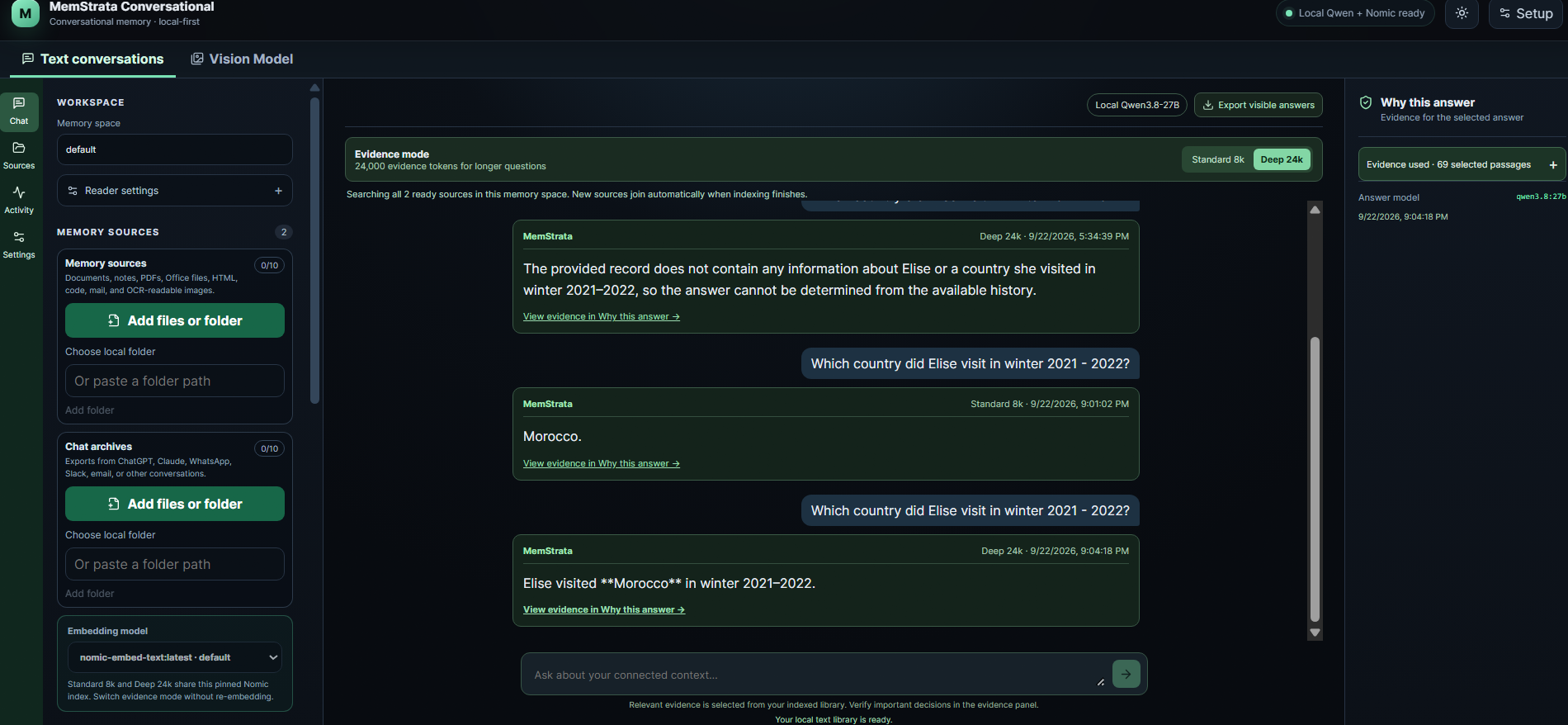
A decision changed. The record did not disappear.
IllustrativeA project review moved from Tuesday to Friday
Ask what day the review is. Open the original note dated Tuesday and the correction dated Friday. The answer should show Friday and the source that changed it.
- 01
Install
Get the Microsoft Store app, or install the pinned Python package and run init. Setup checks the memory components and lets you choose an answer model.
- 02
Add a source
Start with one chat export, note or PDF you can inspect.
- 03
Ask and open the source
Read the answer, then open the selected evidence and the later correction if one exists.
A source you can inspect
Open the original material and see what supports the result. A cited source makes the answer easier to check. It is not a guarantee that every answer is correct.
Will it run on my computer?
This check uses the published install platforms. It does not detect graphics memory.
What it does
- Bring chats, notes and documents into a local index
- Nomic finds relevant text and Tesseract reads scans. In the built-in chat, the answer model you choose writes the answer from the evidence MemStrata selects: a local Ollama model, a local OpenAI-compatible server, or a cloud provider you configure.
- Use the same evidence with the AI you already use: Claude Code over MCP, or the MemStrata CL1 Workspace extension for VS Code and compatible editors.
- Optional ColQwen2 and ColFlor provide PDF and image retrieval by selecting original pages. They are not the final answer.
- EVIE and ColPali are coming soon and are not listed as supported downloads.
- Detecting a GPU is separate from installing a compatible runtime. Visual retrieval and the answer model use separate settings.
- Optional self-hosted remote access serves read-only context over TLS. It is off by default.
Requirements
The hardware guide lists install platforms, answer-model choices for the built-in chat, and evidence limits. See the hardware guide.
- Python 3.10 or newer
- Windows x64, Linux x86_64 with glibc 2.28 or newer, or macOS 15 on Apple silicon
- For the built-in chat: Ollama with nomic-embed-text, and an answer model of your choice. Qwen3.8-27B Q4 (qwen3.8:27b, about 17.7 GB) is suggested, not required. Weights are downloaded by Ollama, not bundled
- Optional: Claude Code or VS Code to use the evidence with the AI you already use
Supported connections
- Ollama, OpenAI-compatible servers or a cloud provider: answer model for the built-in chat (Qwen3.8-27B Q4 suggested)
- Nomic text retrieval: text evidence
- Tesseract OCR: scanned documents
- Claude Code: read-only MCP tools
- MemStrata CL1 Workspace: VS Code and Open VSX extension (0.1.0)
Data handling
Indexes and source processing run on your device. Account, licensing, and optional connectors use MemStrata or destination services. The built-in Conversational chat answers with the model you choose: with a local model the question and evidence stay on your computer, and with a cloud provider they go to that provider after you consent. If you send evidence to a cloud model or an MCP client, the question and selected passages leave the device for that provider. Credentials stay in the operating-system credential vault. Customer content is not used for training unless the customer separately opts in. Conversational 0.8.2, 0.8.3 and 0.8.5 fetch OpenRouter’s public model price list and the Bank of Canada’s public USD/CAD exchange rate only when a cloud provider is configured. Local-only use makes neither request. The Microsoft Store edition delivers 0.8.5 (package 5.7.0.0) from 24 November 2026 and follows the same rule. A Store installation not yet updated from 0.8.0 makes both requests even during local-only use. The requests carry no API key, question, source content or MemStrata account identifier, and reveal your IP address to the service receiving the request.
| Feature | Local material | Possible outbound | Trigger | Credential location |
|---|---|---|---|---|
| OAuth, signed entitlements, and device registration | Device and entitlement cache | Identity and device-bound entitlement fields | Sign-in or refresh | Operating-system credential vault |
| User-selected cloud model, MCP client or connector | Local evidence selection and indexes | Only the data required for that explicit operation. Evidence returned to an MCP client goes to that client’s model provider | User configures and sends the request | Operating-system credential vault |
| MemStrata-managed email | Local alert or report draft | Minimized message and recipient | User-configured delivery; one message per signed-in user per UTC day during trial | Server secret plus entitlement |
| Memory, OCR, answer model, and optional visual retrieval | Conversation archives, notes, documents, selected evidence, and answers from a local answer model | A signed selection check to MemStrata with opaque identifiers and counts, never the question, document text, embeddings or file paths. If you choose a cloud answer model, the question and selected evidence go to that provider after you consent | Each question | Operating-system credential vault |
| Model price list (Conversational 0.8.2, 0.8.3 and 0.8.5) | None | A request for OpenRouter’s public model price list (https://openrouter.ai/api/v1/models) that carries no API key, question, source content or MemStrata account identifier but shows your IP address to OpenRouter | Only with a cloud provider configured. Settings or model-list load, or an explicit Refresh models for OpenRouter. A successful check is reused for 24 hours | Not applicable. No API key is sent |
| Exchange rate (Conversational 0.8.2, 0.8.3 and 0.8.5) | None | A request to the Bank of Canada’s public data service for the US-dollar to Canadian-dollar exchange rate, used to show subscription amounts. It carries no API key, question, source content or MemStrata account identifier but shows your IP address to the Bank of Canada | Only with a cloud provider configured, when you open the dashboard. A successful lookup is reused for a day | Not applicable. No API key is sent |
Install
Install this product
Full product access for 180 days after activation. No subscription during the trial.
Detected: choose your system. Change the operating system if this is wrong.
MemStrata Conversational 0.8.5 · Windows x64 · Python >=3.10
Windows 10 or newer, x64.
This block installs the app, checks its version, then starts onboarding with
memstrata-conversational.cmd init
The Store app delivers 0.8.5 (package 5.7.0.0, verified 2026-11-24). It updates through the Store and needs no Python installation. Use either the Store app or this wheel command, not both at once.
Install with Command Prompt
Use this after activating a Python 3.10+ environment in Command Prompt. It installs the pinned version and starts setup only if installation succeeds.
Command Prompt
python -m pip install --upgrade --only-binary=:all: "memstrata-conversational==0.8.5" && python -m memstrata_conversational_launcher initInstall with PowerShell (for developers)
PowerShell
& {
  $ErrorActionPreference = 'Stop'
  $v = "$env:USERPROFILE\MemStrata\venvs\conversational"
  py -3 -m venv "$v"
  if ($LASTEXITCODE -ne 0) { throw 'Environment creation failed.' }

  $p = (py -3 -c "import os,sys; print(os.path.realpath(sys.argv[1]))" "$v\Scripts\python.exe").Trim()
  if ($LASTEXITCODE -ne 0 -or -not (Test-Path -LiteralPath $p)) { throw 'Environment Python was not found.' }
  & $p -m pip install --upgrade --only-binary=:all: "memstrata-conversational==0.8.5"
  if ($LASTEXITCODE -ne 0) { throw 'Installation failed.' }

  $launcher = Join-Path (Split-Path -Parent $p) 'memstrata-conversational.cmd'
  if (-not (Test-Path -LiteralPath $launcher)) { throw 'Launcher was not installed.' }
  $actual = (& $launcher --pypi-package-version | Out-String).Trim()
  if ($LASTEXITCODE -ne 0 -or $actual -ne '0.8.5') { throw 'Installed version does not match 0.8.5.' }
  & $launcher init
}
memstrata_conversational-0.8.5-py3-none-win_amd64.whl · sha256 c4498adb05dc7cf05612034276d3885a8f766dedf45020499457ff59e74f7ac6
Python and platform requirements
A browser cannot reliably know your OS version or whether Python is installed.
Python 3.10 or newer is required.
If Python is missing, install it from python.org/downloads/windows and open a new terminal.
The environment uses %USERPROFILE%\MemStrata\venvs to avoid Microsoft Store Python's LocalAppData redirection and resulting long package-cache paths. Interpreter realpath resolution is retained.
Troubleshooting
If setup stops, open the troubleshooting guide. Paste the PowerShell block into PowerShell or the separate Command Prompt block into Command Prompt.
MemStrata Conversational 0.8.5 · Linux x86_64 (glibc 2.28 or newer) · Python >=3.10
Linux x86_64 with glibc 2.28 or newer.
This block installs the app, checks its version, then starts onboarding with
memstrata-conversational init
Already in a Python 3.10+ environment:
python -m pip install --upgrade --only-binary=:all: memstrata-conversational==0.8.5
Install with Terminal (bash/zsh)
Terminal (bash/zsh)
venv="$HOME/.local/share/memstrata/venvs/conversational"
python3 -m venv "$venv" || exit 1
"$venv/bin/python" -m pip install --upgrade pip || exit 1
wheel='https://files.pythonhosted.org/packages/b9/76/1b9b1e8a6b6552cb07edc70e8203536c70b61fd38a528fb314f05a6db2cd/memstrata_conversational-0.8.5-py3-none-manylinux_2_28_x86_64.whl'
"$venv/bin/python" -m pip install --only-binary=:all: "$wheel" || exit 1
actual_version=$("$venv/bin/memstrata-conversational" --pypi-package-version) || exit 1
[ "$actual_version" = "0.8.5" ] || { echo "Installed version does not match the advertised release."; exit 1; }
echo "Installed version: $actual_version"
"$venv/bin/memstrata-conversational" init
memstrata_conversational-0.8.5-py3-none-manylinux_2_28_x86_64.whl · sha256 a7f281cf1073672cec0258adfaa571e68d86d87d40f498637a175fbe213b9a44
Python and platform requirements
A browser cannot reliably know your OS version or whether Python is installed.
Python 3.10 or newer is required.
Use bash or zsh on Linux x86_64 with glibc 2.28 or newer.
Your Python installation must include venv and ensurepip. If environment creation reports missing ensurepip,
install your distribution’s Python venv package (usually python3-venv on Debian/Ubuntu) and try again.
Troubleshooting
If setup stops, open the troubleshooting guide.
MemStrata Conversational 0.8.2 · macOS 15 or newer on Apple silicon · Python >=3.10
macOS 15 or newer on Apple silicon.
This block installs the app, checks its version, then starts onboarding with
memstrata-conversational init
Already in a Python 3.10+ environment:
python -m pip install --upgrade --only-binary=:all: memstrata-conversational==0.8.2
Install with Terminal (bash/zsh)
Terminal (bash/zsh)
venv="$HOME/.local/share/memstrata/venvs/conversational"
python3 -m venv "$venv" || exit 1
"$venv/bin/python" -m pip install --upgrade pip || exit 1
wheel='https://files.pythonhosted.org/packages/63/97/92e0d9a25e2b32a5614a7fa538c92eb7bc96756b72fa2a40dc8be3622c06/memstrata_conversational-0.8.2-py3-none-macosx_15_0_arm64.whl'
"$venv/bin/python" -m pip install --only-binary=:all: "$wheel" || exit 1
actual_version=$("$venv/bin/memstrata-conversational" --pypi-package-version) || exit 1
[ "$actual_version" = "0.8.2" ] || { echo "Installed version does not match the advertised release."; exit 1; }
echo "Installed version: $actual_version"
"$venv/bin/memstrata-conversational" init
memstrata_conversational-0.8.2-py3-none-macosx_15_0_arm64.whl · sha256 89778df196461d2f839333125f3a8b5e57626af46f637284e5bf45efd65fd628
Python and platform requirements
A browser cannot reliably know your OS version or whether Python is installed. Python 3.10 or newer is required. Use Terminal on an Apple silicon Mac running macOS 15 or newer, with native arm64 Python. Intel Macs and an x86_64 Python running under Rosetta are not supported by this arm64 wheel.
Troubleshooting
If setup stops, open the troubleshooting guide.
MemStrata Coder 0.6.32 · Windows x64 · Python >=3.10
Windows 10 or newer, x64.
This block installs the app, checks its version, then starts onboarding with
memstrata-coder.cmd init
The Store listing is separate from this wheel command. The version the Store delivers can differ from a newer submission still in certification.
Install with PowerShell (for developers)
PowerShell
$venv = "$env:USERPROFILE\MemStrata\venvs\coder"
py -3 -m venv "$venv"
if ($LASTEXITCODE -ne 0) { throw 'Could not create the environment.' }
$python = "$venv\Scripts\python.exe"
if (-not (Test-Path -LiteralPath $python)) {
  $python = (py -3 -c "import os, sys; print(os.path.realpath(sys.argv[1]))" $python).Trim()
}
if (-not (Test-Path -LiteralPath $python)) { throw 'Could not create the environment.' }
$scripts = Split-Path -Parent $python
& $python -m pip install --upgrade pip
if ($LASTEXITCODE -ne 0) { throw 'Could not update pip.' }
$wheel = 'https://files.pythonhosted.org/packages/d4/85/63fa52b44263148a68f5780dae7e18767a078c69261b5367fce08d79818e/memstrata_coder-0.6.32-py3-none-win_amd64.whl'
& $python -m pip install --only-binary=:all: "$wheel"
if ($LASTEXITCODE -ne 0) { throw 'Installation did not finish.' }
$actualVersion = (& "$scripts\memstrata-coder.cmd" --pypi-package-version | Out-String).Trim()
if ($LASTEXITCODE -ne 0 -or $actualVersion -ne '0.6.32') { throw 'The installed version does not match the advertised release.' }
Write-Output "Installed version: $actualVersion"
& "$scripts\memstrata-coder.cmd" init
memstrata_coder-0.6.32-py3-none-win_amd64.whl · sha256 ef1bd4506921e848f8e7a73a25b3a384a8013456cbddb652e3048b8fec062b26
Python and platform requirements
A browser cannot reliably know your OS version or whether Python is installed.
Python 3.10 or newer is required.
If Python is missing, install it from python.org/downloads/windows and open a new terminal.
The environment uses %USERPROFILE%\MemStrata\venvs to avoid Microsoft Store Python's LocalAppData redirection and resulting long package-cache paths. Interpreter realpath resolution is retained.
Troubleshooting
If setup stops, open the troubleshooting guide. Windows commands are PowerShell. Do not paste them into Command Prompt.
MemStrata Coder 0.6.32 · Linux x86_64 (glibc 2.28 or newer) · Python >=3.10
Linux x86_64 with glibc 2.28 or newer.
This block installs the app, checks its version, then starts onboarding with
memstrata-coder init
Install with Terminal (bash/zsh)
Terminal (bash/zsh)
venv="$HOME/.local/share/memstrata/venvs/coder"
python3 -m venv "$venv" || exit 1
"$venv/bin/python" -m pip install --upgrade pip || exit 1
wheel='https://files.pythonhosted.org/packages/7c/ea/4e56e6f26074f9ee6e8d785b927571a425458b603f25cc9d8d6b425e947a/memstrata_coder-0.6.32-py3-none-manylinux_2_28_x86_64.whl'
"$venv/bin/python" -m pip install --only-binary=:all: "$wheel" || exit 1
actual_version=$("$venv/bin/memstrata-coder" --pypi-package-version) || exit 1
[ "$actual_version" = "0.6.32" ] || { echo "Installed version does not match the advertised release."; exit 1; }
echo "Installed version: $actual_version"
"$venv/bin/memstrata-coder" init
memstrata_coder-0.6.32-py3-none-manylinux_2_28_x86_64.whl · sha256 e3c3a5c39a576963f76a000bdcf455452af051f0371c4b76645a43e1166479a5
Python and platform requirements
A browser cannot reliably know your OS version or whether Python is installed.
Python 3.10 or newer is required.
Use bash or zsh on Linux x86_64 with glibc 2.28 or newer.
Your Python installation must include venv and ensurepip. If environment creation reports missing ensurepip,
install your distribution’s Python venv package (usually python3-venv on Debian/Ubuntu) and try again.
Troubleshooting
If setup stops, open the troubleshooting guide.
MemStrata Coder 0.6.32 · macOS 15 or newer on Apple silicon · Python >=3.10
macOS 15 or newer on Apple silicon.
This block installs the app, checks its version, then starts onboarding with
memstrata-coder init
Install with Terminal (bash/zsh)
Terminal (bash/zsh)
venv="$HOME/.local/share/memstrata/venvs/coder"
python3 -m venv "$venv" || exit 1
"$venv/bin/python" -m pip install --upgrade pip || exit 1
wheel='https://files.pythonhosted.org/packages/d4/0e/1178d2b6dd5cdcfccbcb292b39b6a47ce56d7f225f3fcc3059d713d6d83b/memstrata_coder-0.6.32-py3-none-macosx_15_0_arm64.whl'
"$venv/bin/python" -m pip install --only-binary=:all: "$wheel" || exit 1
actual_version=$("$venv/bin/memstrata-coder" --pypi-package-version) || exit 1
[ "$actual_version" = "0.6.32" ] || { echo "Installed version does not match the advertised release."; exit 1; }
echo "Installed version: $actual_version"
"$venv/bin/memstrata-coder" init
memstrata_coder-0.6.32-py3-none-macosx_15_0_arm64.whl · sha256 85d3b467d1a2694ddeca1b3a392092c59a5cf517dfa6aec129c9f9b9a17999a2
Python and platform requirements
A browser cannot reliably know your OS version or whether Python is installed. Python 3.10 or newer is required. Use Terminal on an Apple silicon Mac running macOS 15 or newer, with native arm64 Python. Intel Macs and an x86_64 Python running under Rosetta are not supported by this arm64 wheel.
Troubleshooting
If setup stops, open the troubleshooting guide.
MemStrata Structured 0.7.3 · Windows x64 · Python >=3.10
Windows 10 or newer, x64.
This block installs the app, checks its version, then starts onboarding with
memstrata-structured.cmd init
The Store listing is separate from this wheel command. The version the Store delivers can differ from a newer submission still in certification.
Install with PowerShell (for developers)
PowerShell
$venv = "$env:USERPROFILE\MemStrata\venvs\structured"
py -3 -m venv "$venv"
if ($LASTEXITCODE -ne 0) { throw 'Could not create the environment.' }
$python = "$venv\Scripts\python.exe"
if (-not (Test-Path -LiteralPath $python)) {
  $python = (py -3 -c "import os, sys; print(os.path.realpath(sys.argv[1]))" $python).Trim()
}
if (-not (Test-Path -LiteralPath $python)) { throw 'Could not create the environment.' }
$scripts = Split-Path -Parent $python
& $python -m pip install --upgrade pip
if ($LASTEXITCODE -ne 0) { throw 'Could not update pip.' }
$base = 'https://github.com/yadu9989/memstrata-binaries'
$release = "$base/releases/download/structured-0.7.3"
$wheel = "$release/memstrata_structured-0.7.3-py3-none-win_amd64.whl"
& $python -m pip install --only-binary=:all: "$wheel"
if ($LASTEXITCODE -ne 0) { throw 'Installation did not finish.' }
$actualVersion = (& "$scripts\memstrata-structured.cmd" --pypi-package-version | Out-String).Trim()
if ($LASTEXITCODE -ne 0 -or $actualVersion -ne '0.7.3') { throw 'The installed version does not match the advertised release.' }
Write-Output "Installed version: $actualVersion"
& "$scripts\memstrata-structured.cmd" init
memstrata_structured-0.7.3-py3-none-win_amd64.whl · sha256 63133a1dae1834a39f02f6eb574e1b9d2a834f784aff98d36f3f86f6392e61e0
Python and platform requirements
A browser cannot reliably know your OS version or whether Python is installed.
Python 3.10 or newer is required.
If Python is missing, install it from python.org/downloads/windows and open a new terminal.
The environment uses %USERPROFILE%\MemStrata\venvs to avoid Microsoft Store Python's LocalAppData redirection and resulting long package-cache paths. Interpreter realpath resolution is retained.
Troubleshooting
If setup stops, open the troubleshooting guide. Windows commands are PowerShell. Do not paste them into Command Prompt.
Structured Windows uses the repaired 0.7.3 GitHub wheel. It does not fall back to PyPI 0.7.0.
MemStrata Structured 0.7.2 · Linux x86_64 (glibc 2.28 or newer) · Python >=3.10
Linux x86_64 with glibc 2.28 or newer.
This block installs the app, checks its version, then starts onboarding with
memstrata-structured init
Install with Terminal (bash/zsh)
Terminal (bash/zsh)
venv="$HOME/.local/share/memstrata/venvs/structured"
python3 -m venv "$venv" || exit 1
"$venv/bin/python" -m pip install --upgrade pip || exit 1
wheel='https://files.pythonhosted.org/packages/2b/78/ac0ba62d5433aa6c7603eb48d08b16f124d0c75c324deb402d1450d80eaa/memstrata_structured-0.7.2-py3-none-manylinux_2_28_x86_64.whl'
"$venv/bin/python" -m pip install --only-binary=:all: "$wheel" || exit 1
actual_version=$("$venv/bin/memstrata-structured" --pypi-package-version) || exit 1
[ "$actual_version" = "0.7.2" ] || { echo "Installed version does not match the advertised release."; exit 1; }
echo "Installed version: $actual_version"
"$venv/bin/memstrata-structured" init
memstrata_structured-0.7.2-py3-none-manylinux_2_28_x86_64.whl · sha256 432f1c83702070a2b5d7819eb00f49e6448a9ae86a664b20f9709264526b5f5b
Python and platform requirements
A browser cannot reliably know your OS version or whether Python is installed.
Python 3.10 or newer is required.
Use bash or zsh on Linux x86_64 with glibc 2.28 or newer.
Your Python installation must include venv and ensurepip. If environment creation reports missing ensurepip,
install your distribution’s Python venv package (usually python3-venv on Debian/Ubuntu) and try again.
Troubleshooting
If setup stops, open the troubleshooting guide.
MemStrata Structured 0.7.2 · macOS 15 or newer on Apple silicon · Python >=3.10
macOS 15 or newer on Apple silicon.
This block installs the app, checks its version, then starts onboarding with
memstrata-structured init
Install with Terminal (bash/zsh)
Terminal (bash/zsh)
venv="$HOME/.local/share/memstrata/venvs/structured"
python3 -m venv "$venv" || exit 1
"$venv/bin/python" -m pip install --upgrade pip || exit 1
base='https://github.com/yadu9989/memstrata-binaries'
release="$base/releases/download/structured-0.7.2"
wheel="$release/memstrata_structured-0.7.2-py3-none-macosx_15_0_arm64.whl"
"$venv/bin/python" -m pip install --only-binary=:all: "$wheel" || exit 1
actual_version=$("$venv/bin/memstrata-structured" --pypi-package-version) || exit 1
[ "$actual_version" = "0.7.2" ] || { echo "Installed version does not match the advertised release."; exit 1; }
echo "Installed version: $actual_version"
"$venv/bin/memstrata-structured" init
memstrata_structured-0.7.2-py3-none-macosx_15_0_arm64.whl · sha256 46d5f8f533baa5d18e3510addff81c4cab9e1e61a975c567db1fabb8f99ffee6
Python and platform requirements
A browser cannot reliably know your OS version or whether Python is installed. Python 3.10 or newer is required. Use Terminal on an Apple silicon Mac running macOS 15 or newer, with native arm64 Python. Intel Macs and an x86_64 Python running under Rosetta are not supported by this arm64 wheel.
Troubleshooting
If setup stops, open the troubleshooting guide.
MemStrata Governance 0.7.2 · Windows x64 · Python >=3.10
Windows 10 or newer, x64.
This block installs the app, checks its version, then starts onboarding with
memstrata-governance.cmd init
The Store listing is separate from this wheel command. The version the Store delivers can differ from a newer submission still in certification.
Install with PowerShell (for developers)
PowerShell
$venv = "$env:USERPROFILE\MemStrata\venvs\governance"
py -3 -m venv "$venv"
if ($LASTEXITCODE -ne 0) { throw 'Could not create the environment.' }
$python = "$venv\Scripts\python.exe"
if (-not (Test-Path -LiteralPath $python)) {
  $python = (py -3 -c "import os, sys; print(os.path.realpath(sys.argv[1]))" $python).Trim()
}
if (-not (Test-Path -LiteralPath $python)) { throw 'Could not create the environment.' }
$scripts = Split-Path -Parent $python
& $python -m pip install --upgrade pip
if ($LASTEXITCODE -ne 0) { throw 'Could not update pip.' }
$wheel = 'https://files.pythonhosted.org/packages/5f/fa/121c7399f4ec5c4d132fbb3b81f213ed3428860d78b10d261086f557dc7e/memstrata_governance-0.7.2-py3-none-win_amd64.whl'
& $python -m pip install --only-binary=:all: "$wheel"
if ($LASTEXITCODE -ne 0) { throw 'Installation did not finish.' }
$actualVersion = (& "$scripts\memstrata-governance.cmd" --pypi-package-version | Out-String).Trim()
if ($LASTEXITCODE -ne 0 -or $actualVersion -ne '0.7.2') { throw 'The installed version does not match the advertised release.' }
Write-Output "Installed version: $actualVersion"
& "$scripts\memstrata-governance.cmd" init
memstrata_governance-0.7.2-py3-none-win_amd64.whl · sha256 39e716f1b57cbd4c7551dcc59469407f7917a0f19f124d8c678b450555e4a407
Python and platform requirements
A browser cannot reliably know your OS version or whether Python is installed.
Python 3.10 or newer is required.
If Python is missing, install it from python.org/downloads/windows and open a new terminal.
The environment uses %USERPROFILE%\MemStrata\venvs to avoid Microsoft Store Python's LocalAppData redirection and resulting long package-cache paths. Interpreter realpath resolution is retained.
Troubleshooting
If setup stops, open the troubleshooting guide. Windows commands are PowerShell. Do not paste them into Command Prompt.
MemStrata Governance 0.7.2 · Linux x86_64 (glibc 2.28 or newer) · Python >=3.10
Linux x86_64 with glibc 2.28 or newer.
This block installs the app, checks its version, then starts onboarding with
memstrata-governance init
Install with Terminal (bash/zsh)
Terminal (bash/zsh)
venv="$HOME/.local/share/memstrata/venvs/governance"
python3 -m venv "$venv" || exit 1
"$venv/bin/python" -m pip install --upgrade pip || exit 1
wheel='https://files.pythonhosted.org/packages/79/4e/906aa2ddf6506cbabc30cdf918856f0d4cef2c0319e37572a0388beb0763/memstrata_governance-0.7.2-py3-none-manylinux_2_28_x86_64.whl'
"$venv/bin/python" -m pip install --only-binary=:all: "$wheel" || exit 1
actual_version=$("$venv/bin/memstrata-governance" --pypi-package-version) || exit 1
[ "$actual_version" = "0.7.2" ] || { echo "Installed version does not match the advertised release."; exit 1; }
echo "Installed version: $actual_version"
"$venv/bin/memstrata-governance" init
memstrata_governance-0.7.2-py3-none-manylinux_2_28_x86_64.whl · sha256 08a46ee0a6d627e6114ce330791ee77f9a9e707b37a585d794784f94e05375fa
Python and platform requirements
A browser cannot reliably know your OS version or whether Python is installed.
Python 3.10 or newer is required.
Use bash or zsh on Linux x86_64 with glibc 2.28 or newer.
Your Python installation must include venv and ensurepip. If environment creation reports missing ensurepip,
install your distribution’s Python venv package (usually python3-venv on Debian/Ubuntu) and try again.
Troubleshooting
If setup stops, open the troubleshooting guide.
MemStrata Governance 0.7.2 · macOS 15 or newer on Apple silicon · Python >=3.10
macOS 15 or newer on Apple silicon.
This block installs the app, checks its version, then starts onboarding with
memstrata-governance init
Install with Terminal (bash/zsh)
Terminal (bash/zsh)
venv="$HOME/.local/share/memstrata/venvs/governance"
python3 -m venv "$venv" || exit 1
"$venv/bin/python" -m pip install --upgrade pip || exit 1
wheel='https://files.pythonhosted.org/packages/db/9a/5f02c7da3ea9bf04f6c229c5d87bead3f062422e08e41ce4ef38a2899d47/memstrata_governance-0.7.2-py3-none-macosx_15_0_arm64.whl'
"$venv/bin/python" -m pip install --only-binary=:all: "$wheel" || exit 1
actual_version=$("$venv/bin/memstrata-governance" --pypi-package-version) || exit 1
[ "$actual_version" = "0.7.2" ] || { echo "Installed version does not match the advertised release."; exit 1; }
echo "Installed version: $actual_version"
"$venv/bin/memstrata-governance" init
memstrata_governance-0.7.2-py3-none-macosx_15_0_arm64.whl · sha256 19411dacfbc5b1bb62f1d3e197a740b38916f33cd998f1bfb9179e69d9472ada
Python and platform requirements
A browser cannot reliably know your OS version or whether Python is installed. Python 3.10 or newer is required. Use Terminal on an Apple silicon Mac running macOS 15 or newer, with native arm64 Python. Intel Macs and an x86_64 Python running under Rosetta are not supported by this arm64 wheel.
Troubleshooting
If setup stops, open the troubleshooting guide.
180 days of full product access after activation. No subscription during the trial. Reinstalling does not restart it. Model-provider charges, if any, are separate. MemStrata-managed email is limited to one message per signed-in user per UTC day. For access after the trial, contact us about paid access. Trial terms
FAQ
Which model writes the answer?
In the built-in chat, the answer model you choose: a local Ollama model, a local OpenAI-compatible server such as llama.cpp, or a cloud provider you configure. Qwen3.8-27B Q4 is suggested because it was used in our benchmarks, but it is not required. Published accuracy figures apply only to their measured Qwen configuration. With Claude Code or the VS Code extension, the AI you already use reads the evidence MemStrata selects.
What reaches a cloud provider?
With a local answer model, the built-in chat keeps the question, evidence and answer on your computer. If you configure a cloud provider, Setup asks for consent before it sends questions and selected evidence to that provider. If you connect Claude Code or another client, the evidence it receives goes to the model provider that client uses. Account services and a signed selection check use MemStrata services; the selection check carries opaque identifiers, not your question or documents. Conversational 0.8.2, 0.8.3 and 0.8.5 fetch OpenRouter’s public model price list and the Bank of Canada’s public USD/CAD exchange rate only when a cloud provider is configured. Local-only use makes neither request. The Microsoft Store edition delivers 0.8.5 (package 5.7.0.0) from 24 November 2026 and follows the same rule. A Store installation not yet updated from 0.8.0 makes both requests even during local-only use. The requests carry no API key, question, source content or MemStrata account identifier, and reveal your IP address to the service receiving the request.
Who answers a PDF question?
Nomic or a visual retriever selects evidence. Tesseract reads scans. The AI you connect writes the answer. Visual retrievers are not the final answer.
Where are model weights stored?
Ollama downloads and stores them on your computer. MemStrata does not bundle or upload model weights.
Is it available in the Microsoft Store?
Yes. MemStrata Conversational Memory in the Microsoft Store delivers 0.8.5 (Store package 5.7.0.0) and updates itself. It uses separately installed optional components, such as Ollama and Tesseract, and has no MemStrata runtime or model download controls. Background startup stays off until you switch it on.
Is retrieval slow on large libraries?
It can be. In Conversational 0.8.5, retrieval across a whole large library can still be slow, and a request can run past the time limit that applies to each selection check. Whole-library questions consider at most 32 sources, admitted in rank order while they fit the engine limits. Selecting one or more sources avoids both problems.
What happens when evidence is insufficient?
The product should show that the selected evidence is limited rather than invent a source. Inspect the evidence panel before treating the answer as complete.